
What Are Cable Management Systems and Why Use Them?
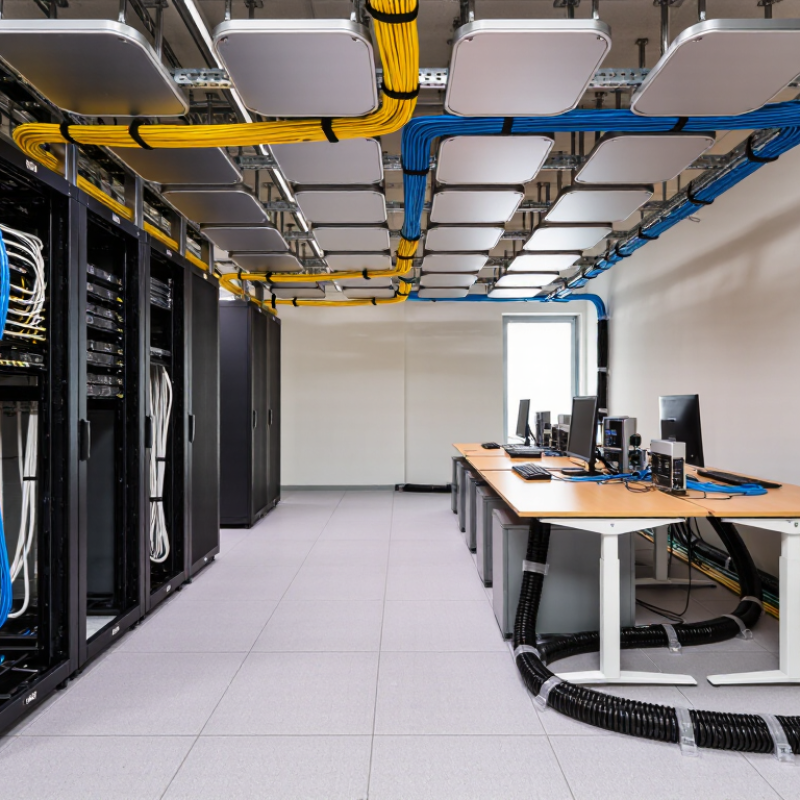
Cable management systems are organized methods for routing, securing, protecting, and identifying cables. They include trays, raceways, conduits, clips, sleeves, and under-desk channels. These components turn loose wiring into a controlled pathway. A server room may use overhead trays, while a home office may need only a cable sleeve and adhesive clips.
The value becomes clear near crowded equipment. A properly routed cable is less likely to snag, bend sharply, or disconnect accidentally. It also improves airflow around network equipment and makes maintenance easier. Technicians can trace one labeled cable without moving every device. That saves time during upgrades, inspections, and troubleshooting. It can also reduce visible clutter, especially beneath desks and along walls.
I have seen tidy installations fail because the cables were packed too tightly. Appearance alone is not enough. Good systems respect bend radius, heat exposure, weight limits, and future expansion. A tray should leave room for additional cables, not just today’s bundle. Labels should remain readable after dust, movement, and repeated servicing. Small details matter.
There is no universal solution. A flexible sleeve may suit a workstation, but a metal tray may better support industrial wiring. The right choice depends on cable type, location, accessibility, and safety requirements. Reliable installation follows manufacturer guidance and local electrical standards. Even then, a second review helps. Plans change. Cables multiply. A practical cable management systems strategy anticipates those realities while keeping the installation safe, accessible, and maintainable.
Definition and Core Purpose of Cable Management Systems
Cable management systems are organized methods for routing, securing, protecting, and identifying cables. They include trays, conduits, clips, sleeves, panels, and labeled pathways. Their core purpose is simple: keep cables controlled and accessible. A well-planned system separates power, data, and signal lines where necessary. It also prevents loose wires from becoming tangled under desks or behind equipment.
In real installations, good cable management improves airflow, maintenance, and workplace safety. Technicians can trace one labeled cable instead of pulling several from a crowded bundle. Proper support also reduces bending, crushing, and strain at connectors. This matters in offices, workshops, server rooms, and production areas. However, neatness alone is not enough. I have seen tidy-looking bundles that were packed too tightly, making repairs difficult. Every system needs room for inspection and future changes.
Tips: Measure the route before buying materials. Leave gentle bends, not sharp corners. Label both ends of important cables. Keep power and sensitive signal cables separated when required. Use supports that match the cable weight. Avoid sealing a bundle so tightly that heat cannot escape. Review the layout after installation, because the first plan is sometimes wrong.
Main Types and Components of Cable Management Systems
Cable management systems organize, protect, and route power and data cables. Common types include cable trays, ladder racks, conduits, raceways, and underfloor pathways. Open trays suit large cable bundles and allow airflow; conduits protect wiring in exposed or high-traffic areas. Raceways keep smaller runs tidy along walls or equipment frames. Underfloor routes are useful in server rooms, though they can make later changes awkward.
A complete system includes more than its main pathway. Look for brackets, support rails, bends, junctions, covers, clamps, and labeling points. Velcro ties can hold bundles without squeezing them; tight plastic ties may damage insulation or make repairs harder. Keep power and data cables separated where equipment guidance calls for it, and leave slack near movable racks. Small details matter.
The Uptime Institute’s 2024 Global Data Center Survey reported that 54% of respondents said their most recent significant outage cost more than $100,000. Cable routing alone cannot prevent outages, but clear pathways can make faults easier to trace and maintenance safer. Measure fill capacity before adding cables, and preserve access to panels and airflow openings. A neat rack is not automatically a good one. Check it under real working conditions.
What Are Cable Management Systems and Why Use Them?
Cable management systems organize and protect cables along walls, ceilings, floors, and equipment racks. They help reduce tangling and physical damage while making cables easier to identify, access, and maintain.
Main Types: Is the Cable Pathway Enclosed?
Scale: 1 = enclosed by default; 0 = not enclosed by default. Conduit and covered raceway enclose cables. Open cable trays, ladder trays, and wire-mesh trays do not; some tray systems can be fitted with covers.
Common Components
Systems may include pathways such as conduit, raceway, or tray; fittings and supports; fasteners; covers; dividers; and cable labels. The components used depend on the installation environment and the required level of protection and access.
How Cable Management Systems Organize and Protect Cables
Cable management systems use trays, raceways, sleeves, and clips to guide cables along walls, desks, or equipment racks. They keep power and data lines from tangling or dragging across sharp edges. A tray beneath a workbench, for example, can lift cords away from chair wheels and spilled drinks. Neat routing also makes individual cables easier to trace during repairs. That matters.
Good systems protect cables by reducing friction, kinks, and accidental pulls. Leave enough slack for equipment to move, and avoid crushing cables with tight ties. Keep power and data lines separated when practical, especially in setups where electrical interference could affect sensitive signals.
Label both ends before routing; a small tag can save time later. It is easy to over-organize a workspace, though. A packed channel may hide damaged insulation or make future changes frustrating.
Tips: Choose a route that stays accessible, then secure cables loosely at regular intervals. Check bends near plugs and corners. Leave room for airflow around warm equipment, and inspect hidden runs occasionally. A tidy setup still needs maintenance.
Key Benefits in Homes, Offices, and Industrial Environments
Cable management systems are organized methods for routing, securing, and protecting electrical and data cables. They include trays, conduits, clips, sleeves, and labeled channels. In homes, these tools keep cables away from walking areas, pets, and children. A sleeve behind a desk can hide several chargers and reduce dust around outlets. The room feels calmer, and cleaning becomes easier.
Offices benefit from clearer workstations and faster maintenance. Technicians can trace a labeled cable without moving every device. This reduces accidental disconnections during upgrades. In industrial environments, strong cable trays protect wiring from heat, vibration, moisture, and moving equipment. Proper separation can also reduce interference between power and communication lines. Still, no system is perfect. Poor labeling, overloaded trays, or tight bends can create new problems. Regular inspections remain necessary.
Tips: Measure cable routes before buying materials. Leave gentle bends and spare length for future changes. Use labels at both ends, not only near the device. Keep damaged cables out of service. In workplaces, follow local electrical guidance and ask a qualified professional to review high-voltage installations. A useful habit is photographing the finished layout before closing panels. This small record can save time later, although it may not replace a proper maintenance plan.
| Environment | Common Cable Management Systems | Typical Applications | Key Benefits | Practical Considerations |
|---|---|---|---|---|
| Homes | Adhesive cable clips, cable sleeves, under-desk trays, and surface raceways | Routing television, computer, speaker, and network cables along walls, behind furniture, or beneath desks | Reduces visible clutter, helps keep cords away from walkways, and makes rooms easier to clean and organize | Choose a system suited to the surface and cable load. Keep cords clear of heat sources, door hinges, and places where they could be pinched. |
| Offices | Under-desk cable trays, desk grommets, floor cable covers, and structured cable pathways | Managing power and data connections at workstations, meeting tables, and shared equipment areas | Improves workstation organization, simplifies equipment changes, and can reduce trip hazards from loose cords | Leave enough slack for adjustable desks and movable equipment. Keep power and data cables arranged according to applicable building and electrical requirements. |
| Industrial environments | Cable trays, ladders, conduits, protective conduits, and industrial cable carriers | Supporting power, control, and communication cables along machinery, production lines, and building infrastructure | Provides organized routing, supports inspection and maintenance, and can protect cables from mechanical damage when correctly selected | Consider load capacity, temperature, moisture, chemicals, vibration, and moving machinery. Use suitable materials and follow applicable electrical and safety codes. |
| Shared walkways and floor areas | Floor cable covers, ramps, and routed floor or ceiling pathways | Temporary events, work areas, or locations where cables must cross pedestrian routes | Helps keep cables contained and makes crossings more visible and less likely to snag or be stepped on | Use covers designed for the location and expected traffic. Secure them properly and avoid creating an uneven or obstructed walking surface. |
| Equipment racks and server areas | Vertical and horizontal cable managers, hook-and-loop ties, and rack-mounted organizers | Routing network and power connections within equipment racks and communication cabinets | Makes connections easier to trace, supports orderly maintenance, and helps prevent cables from blocking equipment access | Avoid overtightening ties or bending cables beyond their recommended bend radius. Preserve airflow and label connections where useful. |
| General selection and upkeep | Any system matched to the cable type, location, and installation conditions | New installations, renovations, equipment upgrades, and ongoing cable maintenance | Well-planned cable routing can improve accessibility, organization, and protection across many settings | Allow room for future cables, avoid overfilling pathways, inspect supports periodically, and consult qualified professionals for regulated or high-risk installations. |
Factors to Consider When Choosing a Cable Management System
Cable management systems organize, support, and protect power, data, and control cables. They include trays, ducts, conduits, racks, clips, and flexible sleeves. The right system reduces tangles, protects connectors, and keeps airflow moving around equipment. It also makes faults easier to locate. A clean installation is not automatically a good installation.
Start with cable type and weight. Fiber cables need gentle bends, while heavy power lines require stronger supports and separation. Check the minimum bend radius and relevant electrical safety requirements. Measure the route carefully. A tray that looks spacious may become crowded after one expansion. Leave practical spare capacity, not an optimistic estimate.
The environment matters just as much. Dusty workshops, damp utility areas, and hot ceiling spaces need different materials and protection levels. Consider corrosion resistance, temperature range, fire performance, and impact resistance. Access is another test. Can a technician remove one cable without disturbing ten others? Choose covers, doors, or open trays according to inspection needs. Think about future changes, too. Modular parts can simplify repairs, although they may cost more initially. In real installations, installation time often exposes weak planning. A system that looks perfect on paper can feel awkward above a crowded ceiling. Walk the route before ordering.
Related Posts
-
How to Choose the Best Cable Management Systems for Your Home?
-
What is Cable Management Systems? Benefits and Best Practices Explained
-

China Top Wire Management Solutions at the 139th Canton Fair?
-

What is Cable Management Systems and Why Are They Important?
-

Ultimate Guide to Innovative Cable Holder Solutions for a Clutter Free Space
-

Top 10 Cable Management Solutions for Global Buyers